Secured Account Sharing
Can you name everyone who knows the password to your HR or accounting email account?
If you hesitated—you’ve found the problem.
The problem: one password, multiple people, no way to track who did what.
Someone leaves. Password changes. Access breaks. And now you’re not sure who actually handled that vendor payment or updated that employee file.
Why This Matters
Shared passwords create three connected problems:
- You can’t track who accessed what—or when
- Former employees may still have the password
- Compliance audits flag this as a security gap
The Fix Is Simple
Keep the HR and accounting email accounts. But let people access them through their own login.
Both Microsoft 365 and Google Workspace already have this built in—no extra licenses needed.
How It Works (Quick Overview)
Microsoft 365: Shared Mailbox delegation
You create the role-based mailbox (hr@company.com). Then grant access to individual user accounts without sharing the password.
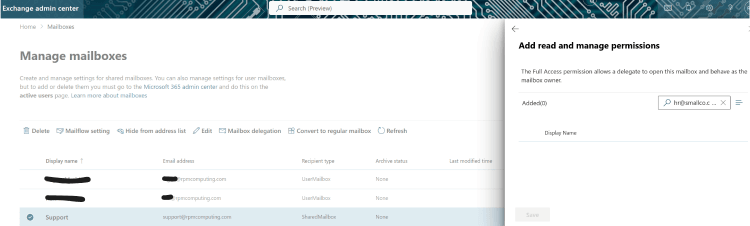
[Go to Exchange Admin Center > Recipients > Shared Mailboxes > Select mailbox > Edit > Delegation. Add individual users.]
Google Workspace: Google Groups with Collaborative Inbox
Google works differently – this will require multi-steps if having the same address is important. But at it’s basic level follow this:
Create a Google Group with a custom email (hr@company.com or accounting@company.com). Add team members to the group, then enable Collaborative Inbox. Each person accesses it with their own login—no shared password needed.
[Go to Google Groups > Create group > Scroll to ‘Enable additional Google Groups features’ > Select ‘Collaborative Inbox’. Add team members.]
Three Immediate Wins
- You know who accessed what — Every action logs to an individual account
- Onboarding and offboarding become simple — No password passing. Just add or remove access.
- No additional cost — It’s already in Microsoft 365 and Google Workspace.
Quick Audit: What Else to Check
While you’re in there, look for these too:
- Shared drives or folders with shared passwords
- Generic logins (admin, owner, boss) used by multiple people
- Accounts tied to former employees that no one has touched
- Contractor or vendor access that’s never been revoked
Next Steps
If this sounds familiar, you probably have a few other things set up the same way. That’s normal for growing small teams.
But these gaps add up—and they’re easier to fix now than after something goes wrong.
If you want to walk through the setup or do a quick audit of your other accounts, I can help. Let’s talk about where your biggest risks are.